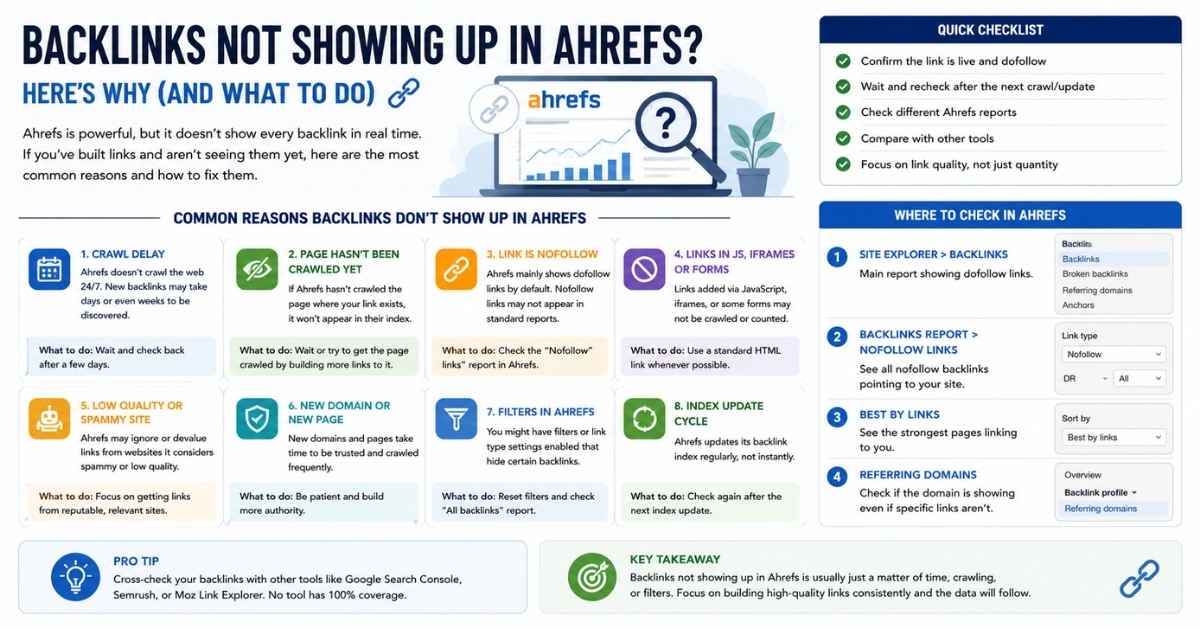
Backlinks not showing up in Ahrefs is usually caused by crawl delays, indexing issues, robots.txt restrictions, canonical tags, JavaScript-rendered links, or the fact that Ahrefs has not yet discovered and processed the referring page. In many cases, the backlink exists and may even be visible to Google Search Console, but it has not yet been added to the Ahrefs backlink database.
If you recently built backlinks and cannot see them in Site Explorer, don't panic. Missing backlinks do not automatically mean your link-building campaign failed or that you wasted money. Understanding how AhrefsBot, Googlebot, crawling, indexing, and backlink discovery work can help you identify the real cause and decide whether you need to take action.
In this guide, you'll learn why are my backlinks not showing up, how Ahrefs discovers links, why backlink reports differ between tools, and the exact steps you can take to troubleshoot missing backlinks.
Quick Answer: Why Are My Backlinks Not Showing Up?
If your backlinks are not showing up in Ahrefs, one of these reasons is usually responsible:
- The backlink is too new.
- Ahrefs has not crawled the referring page yet.
- The page is not indexed.
- Robots.txt is blocking AhrefsBot.
- Canonical tags point elsewhere.
- The backlink sits behind JavaScript.
- Redirect chains are interfering with discovery.
- The referring page has low crawl priority.
- The link was removed or changed.
- Ahrefs has not processed the crawl data yet.
The good news is that most missing backlink issues are temporary and can be resolved through proper investigation.
Why This Problem Causes So Much Confusion for SEO Professionals
Few SEO issues create as much frustration as seeing a backlink live on a website while Ahrefs reports nothing.
The Expectation vs Reality Gap
Many marketers assume backlink reporting works instantly.
The process seems simple:
- Publish a backlink.
- Ahrefs finds it.
- The backlink appears in reports.
In reality, backlink discovery involves multiple stages:
- Publication
- Crawling
- Processing
- Database updates
- Report generation
Any delay in one stage can prevent backlinks from appearing.
For example, a guest post may go live today, but Ahrefs may not crawl that page for several days or weeks depending on the website's crawl frequency.
The Hidden Fear Behind Missing Backlinks
Most users searching this topic have a deeper concern.
They are not really asking:
Why is Ahrefs not showing my backlink?
They are asking:
Did I waste money on link building?
Or:
Is my SEO agency actually building links?
Or:
Why are rankings not improving?
Understanding this psychology is important because the solution often involves verifying the quality and discoverability of the referring page rather than blaming Ahrefs itself.
How Ahrefs Actually Finds and Reports Backlinks
To diagnose backlink reporting problems, you must first understand how Ahrefs discovers links.
Understanding the Journey From Link Creation to Ahrefs Report
A backlink goes through several stages before it appears in Ahrefs.
Stage 1: Link Publication
The backlink is added to a page.
This could be:
- A guest post
- Resource page
- Directory listing
- Crunchbase profile
- News mention
- Niche edit
Stage 2: AhrefsBot Crawls the Page
The Ahrefs crawler known as AhrefsBot visits the page.
If AhrefsBot cannot access the page, it cannot discover the backlink.
Stage 3: Data Processing
After crawling, Ahrefs processes:
- Referring domains
- Anchor text
- Link attributes
- Follow vs nofollow signals
- Canonical URLs
Stage 4: Database Update
The backlink is added to the Ahrefs index and becomes visible inside reports.
This process may take days or even weeks depending on the site.
AhrefsBot vs Googlebot
One of the biggest misconceptions in SEO is assuming Ahrefs sees exactly what Google sees.
It doesn't.
Googlebot and AhrefsBot are completely different crawlers.
Google has:
- Larger infrastructure
- Higher crawl frequency
- Better page discovery systems
- Access to data unavailable to third-party tools
Meanwhile, Ahrefs operates its own independent crawler and backlink database.
That explains why:
- Search Console may show a backlink.
- Ahrefs may not show it.
- Semrush may show it.
- Moz may miss it entirely.
These differences are normal.
Why New Backlinks Rarely Appear Instantly
Several factors influence backlink discovery speed.
Site Authority
High-authority sites often receive more frequent crawls.
Examples include:
- Major news websites
- Popular blogs
- Industry publications
A backlink from these websites may appear much faster.
Internal Linking
Pages linked prominently throughout a website tend to be discovered sooner.
Page Popularity
Frequently visited pages attract crawlers more often than buried pages.
Crawl Frequency
Some websites are crawled daily.
Others may only be crawled every few weeks.
This is one of the most common reasons new backlinks are missing.
Why Are My Backlinks Not Showing Up? The 10 Most Common Reasons
Understanding these causes will help you troubleshoot backlink visibility problems much faster.
The Backlink Was Published Recently
This is by far the most common explanation.
Many users expect immediate reporting.
However, backlink discovery often takes time.
A newly published guest post may not appear in Ahrefs for several days or weeks.
If your backlink is less than two weeks old, patience is usually the best strategy.
The Referring Page Has Not Been Crawled Yet
Even if the page exists and functions perfectly, Ahrefs cannot report a backlink until it crawls the referring page.
This often happens on:
- Small blogs
- New websites
- Low-traffic directories
- Deep archive pages
The backlink exists, but Ahrefs simply hasn't discovered it.
The Page Is Not Indexed
A page that is not indexed can be difficult for crawlers to find.
Use Google search operators to verify whether the referring URL is indexed.
If Google cannot find the page, backlink discovery may be delayed significantly.
Robots.txt Is Blocking Crawlers
Some websites accidentally block crawlers through robots.txt directives.
When AhrefsBot is blocked, backlink discovery becomes impossible.
Always inspect robots.txt if backlinks remain missing for extended periods.
Canonical Tags Point Somewhere Else
Canonical tags tell search engines which version of a page should receive credit.
If the page containing your backlink points to another URL through a canonical tag, Ahrefs may attribute the link differently or ignore the duplicate page.
Redirect Chains Are Causing Problems
Complex redirect paths can create reporting delays.
Examples include:
- 301 redirects
- 302 redirects
- Multiple redirect hops
The longer the chain, the more difficult it becomes for crawlers to process efficiently.
The Link Is Hidden Behind JavaScript
Some websites generate links dynamically through JavaScript.
Although Google has become much better at rendering JavaScript, third-party SEO crawlers may experience limitations.
This can result in backlinks not being detected.
The Page Has Low Crawl Priority
Low-priority pages often include:
- Orphan pages
- Deep category pages
- Archive pages
- Profile pages
- Low-traffic resources
Since crawlers allocate resources strategically, these pages may wait much longer for discovery.
The Link Was Removed or Changed
Sometimes the simplest explanation is correct.
Verify that:
- The link still exists.
- The anchor text remains intact.
- The destination URL has not changed.
Many backlinks disappear after content updates.
Ahrefs Has Not Processed the Data Yet
Even after crawling a page, Ahrefs still needs time to process data and update its backlink index.
A short delay between crawling and reporting is completely normal.
A Practical Backlink Audit: Find the Root Cause in 10 Minutes
If you're wondering why are my backlinks not showing up, follow this process before assuming something is wrong.
Step 1: Confirm the Backlink Exists
Open the referring page manually.
Check:
- The backlink is still live.
- The destination URL is correct.
- The anchor text has not changed.
- The page loads properly.
Many backlink problems are simply caused by removed or modified links.
Step 2: Check the Referring URL Status Code
Use a status code checker.
The page should return:
200 OK
Potential issues include:
- 301 Redirect
- 302 Redirect
- 404 Error
- 410 Gone
- 500 Server Error
If the page isn't accessible, AhrefsBot cannot crawl it effectively.
Step 3: Verify Google Indexation
Search Google using:
site:example.com/page-url
If the page is indexed, it has a better chance of being discovered by Ahrefs.
If it is not indexed, investigate:
- Noindex tags
- Thin content
- Crawl restrictions
- Technical SEO issues
Step 4: Inspect Robots.txt
Look for directives blocking crawlers.
Examples:
Disallow: /
Disallow: /directory/
Disallow: /profiles/
Many directory websites accidentally block important pages from being crawled.
Step 5: Review Canonical Tags
Check whether the page contains a canonical URL pointing elsewhere.
A canonical mismatch may affect how backlink data is processed.
Step 6: Check Redirects
Verify:
- The backlink URL
- Destination URL
- Redirect path
Long redirect chains often slow down link discovery and reporting.
Step 7: Validate Link Placement
Links buried inside:
- Footer widgets
- JavaScript elements
- Hidden sections
- User-generated areas
may be harder for crawlers to process.
Contextual editorial links typically receive the most value.
Step 8: Compare Against Google Search Console
This is one of the most important checks.
If Google Search Console shows the backlink but Ahrefs doesn't:
- The backlink likely exists.
- Google has already discovered it.
- Ahrefs may simply be behind.
Step 9: Compare Against Other SEO Tools
Check:
- Semrush
- Moz
- Majestic
If multiple tools report the backlink, the issue may be Ahrefs crawl timing.
Step 10: Assess Crawl Priority
Ask:
- Is the page receiving traffic?
- Is it internally linked?
- Is it regularly updated?
- Is it buried deep within the site?
Low-priority pages often take significantly longer to appear in backlink reports.
Why Search Console Shows Backlinks That Ahrefs Does Not
Many SEO professionals panic when they notice backlink differences between tools.
In reality, this is normal.
Different Databases, Different Results
Every SEO platform maintains its own backlink index.
This means:
- Google Search Console
- Ahrefs
- Semrush
- Moz
- Majestic
all collect data differently.
A backlink appearing in one tool but missing in another is common.
Which Tool Should You Trust?
For Google's understanding of your website:
Google Search Console is the most authoritative source.
For competitive backlink analysis:
Ahrefs remains one of the strongest backlink databases available.
The smartest approach is to use both.
When Search Console Data Matters More
Search Console is particularly useful when:
- Verifying link existence
- Monitoring actual Google-recognized backlinks
- Checking recent discoveries
When Ahrefs Data Matters More
Ahrefs excels at:
- Competitor research
- Referring domain analysis
- Domain Rating evaluation
- Link growth tracking
- Anchor text analysis
Why Dont Links From Crunchbase Show Up in Ahrefs?
One of the most searched backlink questions today is:
Why dont links from Crunchbase show up in Ahrefs?
The answer depends on how Crunchbase handles outbound links.
How Crunchbase Handles External Links
Crunchbase profile links often behave differently from traditional editorial backlinks.
Factors affecting visibility include:
- Nofollow attributes
- Redirect handling
- Profile architecture
- Crawl prioritization
Not every Crunchbase link is processed the same way.
Nofollow, Redirects, and Tracking URLs
Some Crunchbase links use attributes that reduce backlink visibility in third-party tools.
Potential issues include:
- Redirect paths
- Tracking parameters
- Nofollow implementation
- JavaScript elements
These factors may affect how backlink tools interpret the link.
Crawlability Challenges With Large Directory Sites
Large directories contain millions of pages.
Examples include:
- Crunchbase
- Yelp
- Yellow Pages
- Industry directories
Not every page receives equal crawl attention.
As a result, AhrefsBot may take longer to discover profile pages.
When Crunchbase Links May Still Have Value
Even when a Crunchbase backlink is not visible immediately, it may still contribute:
- Brand signals
- Citation value
- Referral traffic
- Entity recognition
A missing Ahrefs report does not automatically mean the link is worthless.
How to Verify Whether a Crunchbase Link Is Being Counted
Check:
- Whether the profile page is indexed.
- Whether the link exists in source code.
- Whether Google can access the page.
- Whether the page receives regular crawling.
These checks often reveal the real issue.
How Long Does Ahrefs Take to Discover Backlinks?
This is one of the most important questions users ask.
Typical Discovery Timelines by Link Type
| Link Type | Average Discovery Time |
| News Mentions | 1–7 Days |
| Editorial Links | 1–14 Days |
| Guest Posts | 7–30 Days |
| Niche Edits | 7–30 Days |
| Resource Pages | 14–45 Days |
| Directory Listings | 30–90 Days |
| Profile Links | 30–120 Days |
These timelines vary depending on crawl frequency.
Factors That Speed Up Discovery
Several factors accelerate backlink discovery:
- High-authority domains
- Strong internal linking
- Fresh content
- Regular crawling
- XML sitemap inclusion
Factors That Slow Down Discovery
Common delays include:
- New websites
- Orphan pages
- Deep pages
- Weak internal linking
- Low traffic
- Crawl restrictions
Real-World Scenarios and What They Usually Mean
Understanding real examples helps eliminate unnecessary panic.
Scenario: Guest Post Published 5 Days Ago
Status:
Normal.
Most guest posts require additional time before appearing in Ahrefs.
No action is usually needed.
Scenario: Backlink Is Indexed but Missing After 30 Days
Status:
Requires investigation.
Check:
- Robots.txt
- Canonical tags
- Crawlability
- Redirects
This is where the audit process becomes valuable.
Scenario: Semrush Finds the Link but Ahrefs Does Not
Status:
Likely crawl timing differences.
Different crawlers discover pages at different speeds.
This does not necessarily indicate a problem.
Scenario: No Tool Detects the Link
Status:
Potential concern.
Possible causes:
- Page not indexed
- Link removed
- Crawl restrictions
- JavaScript rendering issues
- Poor-quality referring page
In this situation, a deeper technical review is recommended.
When Missing Backlinks Are a Warning Sign
Not every missing backlink deserves attention.
Signs Everything Is Normal
You generally do not need to worry when:
- The backlink is less than 30 days old.
- The referring site has low authority.
- The page was recently published.
- Search Console has already discovered the link.
Signs Something Is Wrong
Investigate further when:
- The backlink is older than 60 days.
- The page is indexed.
- Other tools report the link.
- Ahrefs still cannot find it.
Signs a Link Building Service May Have Underperformed
Watch for these red flags:
- Links disappear shortly after publication.
- Pages become deindexed.
- Links exist only temporarily.
- Referring domains show little quality.
A backlink report can often reveal problems with outsourced campaigns.
Red Flags During Backlink Verification
Pay attention to:
- Hidden links
- Sponsored link networks
- Spam directories
- Thin profile pages
- Excessive redirects
These issues reduce long-term SEO value.
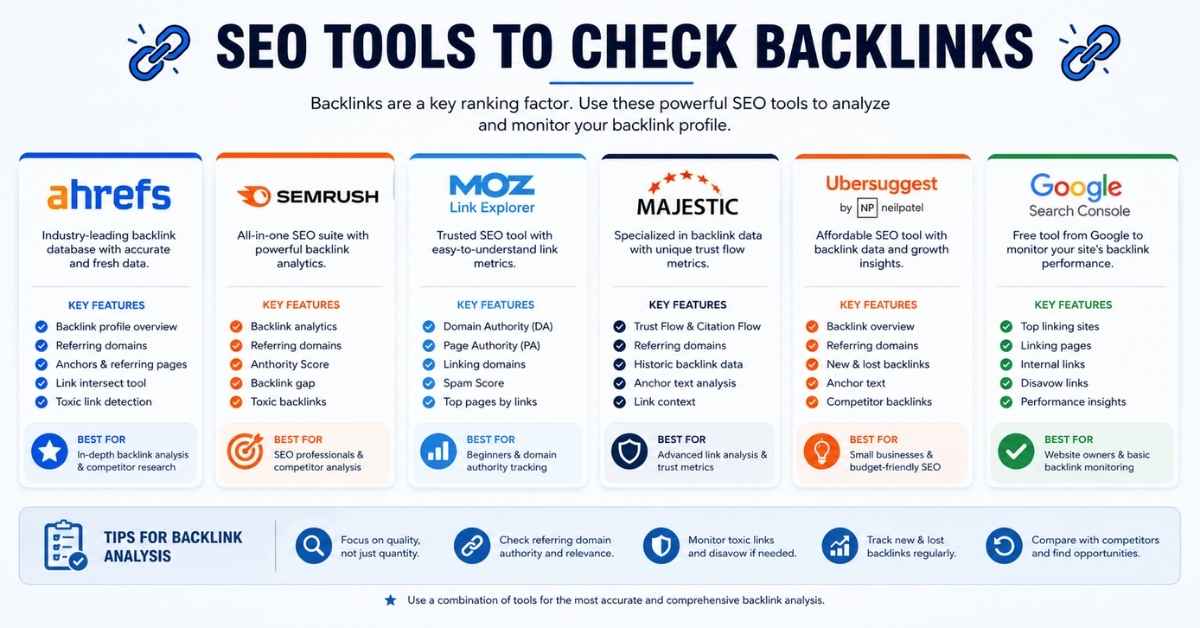
LEARN MORE: SEO tools to check backlinks
Advanced Insights Most Articles Never Mention
Many guides stop after listing a few common reasons. However, experienced SEO professionals know that backlink discovery depends on much more than whether a link exists. Understanding these advanced concepts will help you diagnose problems more accurately.
Why High-Authority Sites Get Crawled Faster
One reason backlinks from major publications appear in Ahrefs more quickly is crawl frequency.
Websites that publish fresh content daily and receive consistent traffic are crawled more often by AhrefsBot and Googlebot. Examples include popular news websites, well-known blogs, and trusted industry resources.
In contrast, a backlink placed on a small blog that publishes once every few months may take much longer to appear because the page is crawled less frequently.
The Relationship Between Crawl Budget and Link Discovery
Although crawl budget is primarily associated with search engines, third-party crawlers also prioritize certain pages.
Factors that influence crawl priority include:
- Website authority
- Internal linking
- Content freshness
- External links pointing to the page
- Historical crawl frequency
Pages with stronger signals are generally discovered faster than isolated or low-value pages.
How Internal Linking Influences Backlink Visibility
Internal links help crawlers discover pages efficiently.
For example:
- A guest post linked from the homepage is easier to find.
- A page buried five levels deep without internal links may remain uncrawled for much longer.
Good internal linking doesn't just improve user navigation—it also increases the chances that backlink crawlers will discover important pages sooner.
Why Some Backlinks Never Appear in Third-Party Tools
Not every backlink is guaranteed to show up in Ahrefs or other SEO tools.
Possible reasons include:
- The referring page is rarely crawled.
- The page is blocked from crawlers.
- The page was removed before being crawled.
- The backlink exists only after JavaScript execution.
- The backlink has been replaced or deleted.
This is why it's important to evaluate backlinks using multiple data sources rather than relying on a single tool.
Understanding Link Equity vs. Link Reporting
Many users assume that if a backlink is not visible in Ahrefs, it provides no SEO value.
That assumption is incorrect.
Link equity and backlink reporting are different concepts.
A backlink may contribute value if search engines can crawl and evaluate it, even if a third-party SEO tool has not yet reported it.
Always distinguish between:
- Whether the backlink exists
- Whether Google can access it
- Whether Ahrefs has discovered it
Backlink Visibility Checklist for Future Campaigns
Following a structured workflow helps reduce reporting issues and makes future backlink monitoring much easier.
Before Building Links
- Choose reputable websites.
- Review the site's crawlability.
- Check whether pages are indexed.
- Avoid spammy directories.
- Prefer editorial, contextual backlinks.
After Publishing Links
Within the first few days:
- Confirm the backlink is live.
- Verify the destination URL.
- Check HTTP status codes.
- Ensure the page is accessible.
During Monthly SEO Audits
Create a routine that includes:
- Reviewing referring domains
- Monitoring new backlinks
- Checking lost backlinks
- Comparing Google Search Console with Ahrefs
- Investigating crawl issues
A monthly audit helps you identify problems before they affect your SEO performance.
Tracking New Referring Domains Efficiently
Instead of checking individual backlinks every day, focus on broader trends.
Track:
- Growth in referring domains
- Changes in Domain Rating (DR)
- URL Rating (UR) improvements
- New referring pages
- Anchor text diversity
These metrics provide a clearer picture of your backlink profile over time.
Frequently Asked Questions
Why are my backlinks not showing up in Ahrefs?
The most common reasons include crawl delays, indexing issues, robots.txt restrictions, canonical tags, JavaScript-generated links, or the fact that AhrefsBot has not yet crawled the referring page. In many cases, waiting a little longer resolves the issue.
How long does Ahrefs take to find backlinks?
There is no fixed timeline. High-authority websites may be crawled within a few days, while smaller websites, profile pages, and directory listings can take several weeks or even months before appearing in Ahrefs.
Can Ahrefs miss backlinks permanently?
Yes. If a referring page is inaccessible, blocked from crawling, removed, or never discovered, Ahrefs may never report that backlink. This does not always mean the backlink lacks SEO value.
Why do backlinks appear in Google Search Console but not Ahrefs?
Google Search Console reflects Google's own data, while Ahrefs maintains an independent backlink database. Because both tools crawl and process the web differently, backlink reports often vary.
Why dont links from Crunchbase show up in Ahrefs?
Crunchbase profile links may not appear immediately due to factors such as nofollow attributes, redirects, crawl frequency, page architecture, or delayed crawling by AhrefsBot. Verify that the profile page is indexed and the backlink is present before assuming there is a problem.
Can robots.txt prevent Ahrefs from finding backlinks?
Yes. If the referring website blocks AhrefsBot through its robots.txt file, the crawler cannot access the page, preventing the backlink from appearing in reports.
Does Ahrefs count nofollow backlinks?
Yes. Ahrefs reports both follow and nofollow backlinks when they are successfully crawled and processed. However, the SEO value of these links differs.
Should I worry if backlinks are not showing after a few days?
Usually not. Newly published backlinks often require time before they appear. If more than 30 to 60 days have passed and the backlink is still missing despite the page being indexed and accessible, perform the troubleshooting steps outlined in this guide.
Final Thoughts
If backlinks not showing up in Ahrefs has left you wondering whether your SEO campaign is failing, remember that delayed backlink reporting is common. In many cases, the issue is related to crawl timing, page indexability, or how AhrefsBot discovers new content, not the quality of your backlink.
Rather than relying on a single metric, use a structured verification process. Confirm that the backlink exists, ensure the referring page is indexed, review technical factors such as robots.txt, canonical tags, and redirects, then compare your findings with Google Search Console and other trusted SEO tools.
The most successful SEO professionals focus on building high-quality backlinks, monitoring referring domains, and conducting regular backlink audits instead of expecting every new link to appear instantly. By understanding how backlink discovery works, you'll make better decisions, identify genuine issues faster, and avoid unnecessary concern over temporary reporting delays.